Discover the new possibilities of Fresh Intranet (Fourth Release 2025)
Fresh Intranet continues to evolve at a breakneck pace. With each release, the platform becomes smarter, more user-friendly and more powerful for communication. In this fourth release of 2025, great strides are again being made: from a brand new Content Creation Wizard to Enterprise Search with Microsoft Copilot Connectors.
In this blog we list the most important changes and show you what to expect in practice.
1. Content Creation Wizard: create professional intranet pages more easily.
Creating new pages is becoming increasingly important for many organizations: publishing news, sharing knowledge, supporting campaigns or providing internal updates. One of the biggest innovations of this release is the introduction of the Content Creation Wizard. This smart, step-by-step tool makes it even easier for intranet administrators and communications teams to create new pages that meet the right structure, metadata and appearance.
How does it work? You choose a template, fill in the most important information (such as title, summary and tags) and Fresh makes sure the page automatically ends up in the right place. This prevents errors, ensures consistency and makes it easier for an organization to keep one line in your internal communications.
Why is this useful?
You don’t have to be an intranet expert to create beautiful pages
All content receives the same, recognizable quality
You save time and do less manual work
Teams can publish faster and more independently
2. Enterprise Search with Copilot Connectors: one central search experience
Search within an organization is often fragmented: documents are in SharePoint, HR information in Workday, manuals in Confluence and tickets in ServiceNow. Fresh is now making this much easier by adding support for Microsoft Copilot Connectors.
This new search capability allows you to search multiple systems at once from one central location. So you get a complete picture without having to navigate through different tools yourself.
What about Fresh Mind? This new search option simply lives alongside Fresh Mind. Where Fresh Mind helps you with AI-driven answers and insights, Enterprise Search via Connectors actually provides comprehensive results from linked systems. Together they form a powerful duo: Fresh Mind for smart and contextual answers, and the Connector integration for broad, cross-system search results.
Why is this useful?
Employees find the right information faster
You don’t have to have knowledge of where information is located
The search experience becomes more organized and consistent
The quality of information within the organization improves
3. Improvements in filters: easier and clearer search
When users search for documents, news or other information, they are given options in Fresh to refine their results. These filters have been further improved to make searching even more intuitive.
Where do you come across these? For example, on pages where you can search for documents or knowledge items, or when you sort results by subject, department or type of information.
What has been improved?
Filters with no results turn light gray: This allows you to immediately see which options yield nothing. This prevents frustration and unnecessary clicking.
One clear button to clear everything at once: A new ‘Clear’ button allows you to delete both your keyword and filters at the same time. This way, you immediately start over with a clean search.
Clearer design: The filter menus are visually tighter, making it quicker to see what is selected.
4. My Tiles: control what you see
My Tiles is a section of Fresh where users can save their most important links or content. What’s new is that you can now easily detach pinned items.
What does this mean? If you previously marked an item as important, you can now just as easily delete it again. This keeps the overview personal and relevant.
Why is this useful?
Users keep control of their home page
Content stays up-to-date and really tailored to what you need
You avoid cluttering your home screen with old or irrelevant links
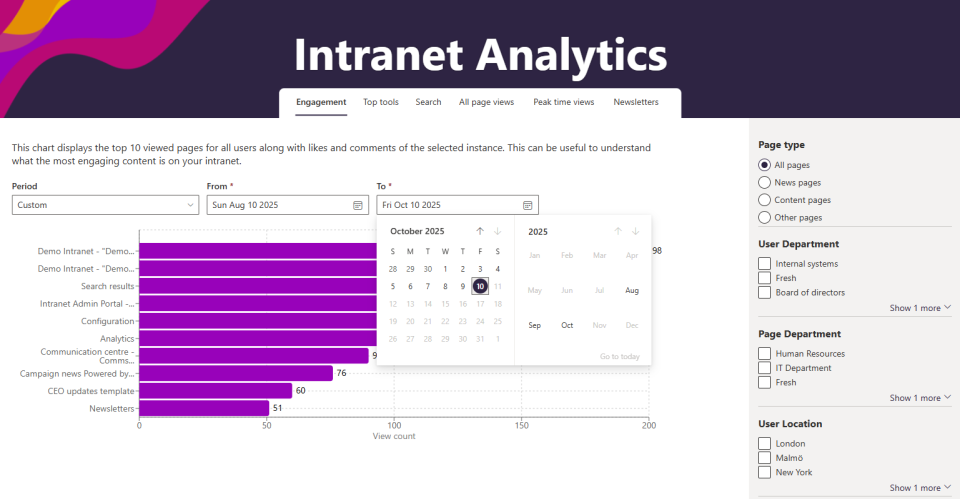
5. Analytics with its own date range: measure what you care about
Understanding the usage of your intranet is essential to driving communication and adoption. Fresh expands analytics with the ability to choose your own date range.
What can you do with this?
Analyze a specific campaign
View the impact of a change (e.g., new home page)
Comparing trends over a chosen time period
Looking back at key moments (e.g., onboarding weeks or year start)
Why is this useful? You see exactly how employees are using your intranet and can act on it immediately.
Fresh keeps moving and each release brings new opportunities for communication, adoption and support. Want to learn more about these features, spar about intranet strategy or discover what this can do for your organization? We’d love to think with you.