With Fresh, you add intranet functionality to SharePoint without an additional platform besides Microsoft 365. Everything runs securely within your own tenant, fully integrated with Teams and Outlook.


As an IT professional, you don’t want an extra management burden or fragmentation of systems. You want grip, security and solutions that are scalable and manageable. Fresh connects seamlessly to your existing Microsoft 365 environment and turns SharePoint into an intranet that can be managed independently by the business, without you having to make constant adjustments.
Fresh uses SharePoint as its base and adds ready-to-use modules and smart functionality. It runs entirely within your own tenant, so no external party can access your data. Because Fresh fully compliant with Microsoft’s security and compliance standards, all information remains protected within your familiar M365 environment.
"Fresh is an excellent fit with SharePoint and Microsoft functionalities, while offering powerful additional features that enrich the user experience. It particularly excels in news and content management, and its support for communities is also strong. In addition, we found the use of AI for search and information management to be one of the better examples we have seen. We are eager to see what else is to come."
"One of Fresh's strengths is its use of AI as a concrete solution to recognizable issues. The AI is secure and manageable, with organizations controlling which libraries and metadata are used and who has access. Because this is done within Microsoft 365, they benefit from less switching, more integration and higher efficiency. For those looking for the right balance of power, simplicity and familiarity, this is a strong offering."
Fresh runs entirely within your own Microsoft 365 tenant. All data remains in SharePoint and is covered by Microsoft’s standard security and compliance. No outside party gets to the data, so you always meet your organization’s security and compliance requirements.
No. Fresh is not a stand-alone platform, but an add-on on top of SharePoint. You don’t have to manage an additional environment: all content and settings remain in Microsoft 365 and fit seamlessly into your existing architecture.
Fresh comes out with new releases four times a year. If there is sufficient knowledge within your IT department, you can perform these updates yourself. M but meal we take this off your hands, so that everything is implemented smoothly and without management burden.
Fresh is designed so that communications teams can publish and manage content independently. IT doesn’t have to intervene with every change. For you, that means fewer tickets and more control over the technical constraints.
Because Fresh running entirely on Microsoft 365 and SharePoint, it automatically scales as your organization grows. Performance and availability benefit directly from Microsoft’s global cloud infrastructure.
Fresh can easily on top of Your existing SharePoint environment will be put in place. All existing content is retained and Fresh adds additional features and a better user experience.
Definitely not! Fresh delivers ready-made modules that work directly within your tenant. That means no lengthy customization processes, just a proven solution that is quick to implement and easy to manage.
Fresh is fully integrated with Teams, Outlook and the rest of Microsoft 365. Employees get intranet notifications in Teams and Outlook and can access the intranet directly from Teams.
Yes. Fresh supports multi-language and provisioning. This allows you to quickly roll out standard environments or pages for different locations or teams, without duplication of effort. In addition vertaald the content automatically.
Less management burden, fewer tickets and more control over security and compliance. Fresh enables the business to work independently, while IT maintains the assurance that everything stays within the technical framework of Microsoft 365. And, of course, a partner who is always ready to help.
Fresh Intranet includes by default FreshMind, an AI tool that runs entirely within your own Microsoft 365 tenant. It uses Microsoft Azure OpenAI, keeping data safe and applying the same security and compliance rules as the rest of your Microsoft environment.
Important to know: FreshMind works differently than Copilot. Copilot searches your entire Microsoft 365 environment (including emails, documents and Teams chats), which can risk unwanted insights. FreshMind stays within your intranet and respects existing permissions: users only get access to the content they are already allowed to see anyway.
Fresh runs entirely within your own Microsoft 365 tenant, using standard Microsoft and Azure-modules, such as Azure Cognitive Services for search functionality, translation and AI. The advantage of this is that you don’t have to bring in separate external services: everything stays within your existing Microsoft environment, with the associated security and compliance.
In practice, this means you don’t have to manage an additional platform or enter into separate contracts. You benefit from the same scalability, updates and security standards you’ve come to expect from Microsoft 365.

As IT, you want to be sure that a solution is secure, scalable and future-proof. But you also want the business to be able to work independently, without you having to constantly make adjustments. That is exactly where we make the difference. We are Microsoft 365 experts with years of experience setting up intranets for organizations with complex environments.
We speak the language of IT and understand the technical challenges you face. We know how to deploy SharePoint smartly as a foundation and how to Fresh optimally configured, without compromising on security, compliance or manageability. At the same time, we see what communication needs to really reach and engage employees. In this way we bring both worlds together in a solution that is both technically sound and embraced by the business.
In short: You can count on a partner who knows pitfalls, thinks along technically and ensures a quick implementation, without lengthy and complex customization processes.
Wondering what exactly Fresh adds to standard SharePoint and where the differences are? In the white paper Standard SharePoint vs. Fresh Intranet we list the most important points. Want to know more about the technical details? Schedule a demo and our experts can tell and show you everything. In this white paper you will read:


Fresh gives you the tools to turn SharePoint into an intranet that really works. Not complicated, but user-friendly and smartly designed. With ready-to-use tools, smart AI and user-friendly modules, you get a grip on your SharePoint intranet and communication. And this is just the beginning:
Create standard workspaces or pages with a single click to, so that structure is always ensured.
Secure consistent construction of content and sites without customization or loose agreements.
Set publishing streams with approval so that only verified content goes live.
Keep track of all changes and easily restore previous versions of pages.
Receive automatic notifications when content is outdated or missing.
Set flexible who may publish or edit, tailored to editors and departments.
All data remains completely within the proprietary Microsoft 365 environment, without external storage.
Automatically benefit from the highest Microsoft standards for security and compliance.
Use existing Microsoft 365 groups for secure access and role management.
Take advantage of Microsoft logging to keep activities insightful.
One familiar environment, without loose tools or unsafe detours.
Security updates and patches automatically follow Microsoft release policies.
Fresh runs entirely in SharePoint and works with Teams and Outlook.
Employees access their intranet directly from Teams, without an additional platform.
Suitable for organizations from 100 to more than 10,000 users.
Support for multiple languages within a single intranet environment.
Display content tailored to department, location or job profile.
Easily add new functionality as the organization grows.
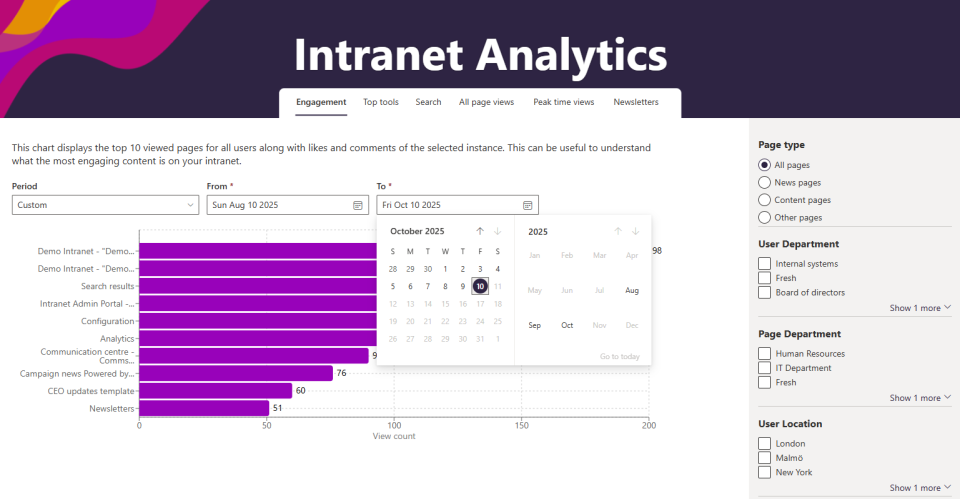
Instantly see how many employees are actively using the intranet.
Measure how many people actually read news or updates.
Track how quickly departments or teams embrace new features.
Export numbers to Excel or Power BI for management reports.
Discover patterns of use and reach; Useful for long-term planning.
Track how internal campaigns score and demonstrate their value to stakeholders.
Use AI within intranet without separate Copilot-license.
AI helps with writing, summarizing and tag of content.
Ask questions and get answers directly from intranet documents.
AI makes smart suggestions for tags and metadata.
Receive notifications when content is outdated or duplicate.
Easily convert content to multiple languages with AI.
New features four times a year without additional management burden.
There are 4 updates per year that we implement and roll out for you.
IT and communications receive support to make the best use of the intranet.
Always clear explanations about setup, management and updates.
Direct lines of communication with our team for technical and functional questions.
Cooperation focused on the long term, so you are never alone.