



Advanced Search for SharePoint

Stop looking, start finding!

Make documents findable faster with smart refiners, flexible filters and a powerful search experience in SharePoint. As little as €0.45 per employee.

Find documents faster within SharePoint

Search smartly within metadata, files and document numbers

Flexible filters and powerful refiners for large document environments

Searching in SharePoint

Why does searching in SharePoint take more time than it should?

Within many organizations, SharePoint is growing to become the central place for documents, files and collaboration. But as the number of documents, sites and metadata grows, information retrieval often becomes increasingly difficult. Users lose time searching among endless filters, miss important refinement values or have to know almost exact document numbers to find the right document at all. Especially within large document environments, this causes daily frustration, inefficiency and unnecessary loss of time

What are organizations running into?

Whitepaper

SharePoint Search vs. Advanced Search

In this white paper, we compare standard SharePoint search functionality with Advanced Search. We show what users often encounter within standard SharePoint Search and how Advanced Search makes a difference with smart refiners, more flexible metadata filters and a more user-friendly search experience that saves time every day.

How does Advanced Search work in SharePoint?

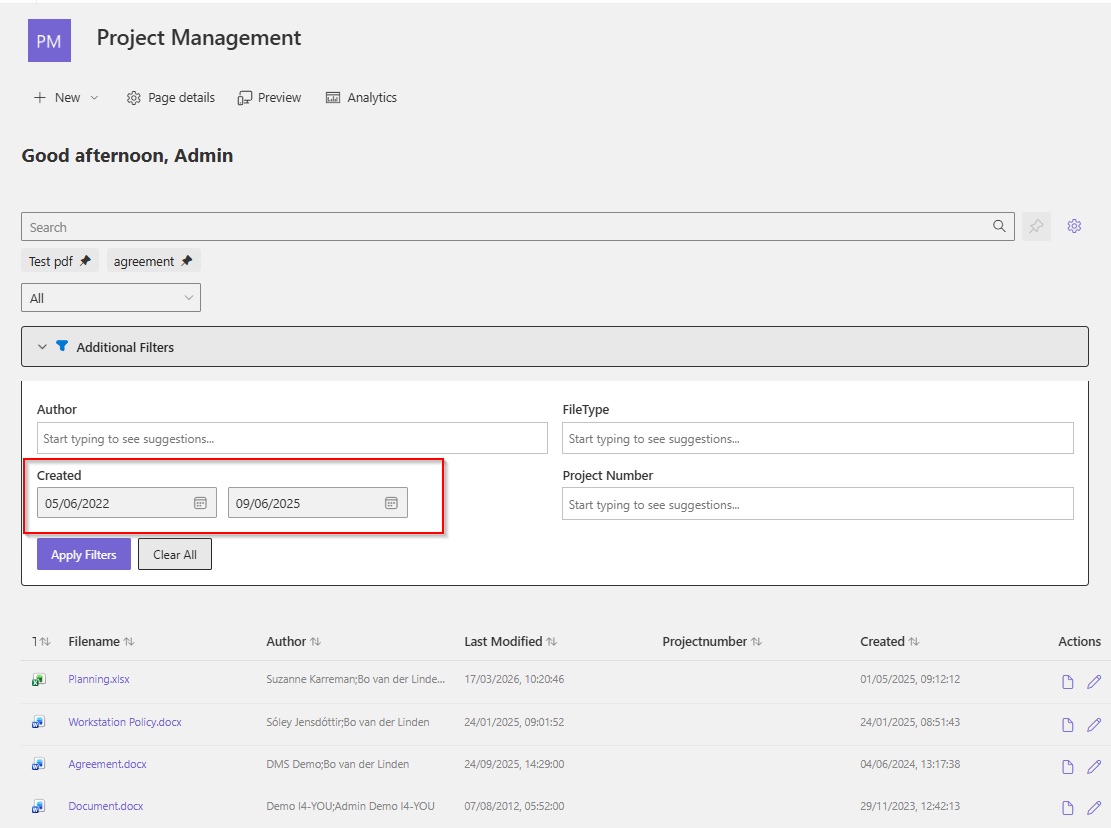
Advanced Search adds a smart and easy-to-use search layer to SharePoint. Instead of endless searching, users can find documents faster with powerful refiners, flexible metadata filters and dynamic search options. Users can easily search within document numbers, metadata, people, projects and other refiners without the limitations of standard SharePoint filters.

As you type, relevant refinement values and suggestions are immediately displayed, helping users find the right filters and documents faster. In addition, Advanced Search supports flexible date filters, search by partial metadata values and better support for complex metadata with multiple values. This makes searching within SharePoint clearer, more accurate and much less time-consuming.

Read more about this in our blog:
“From searching to finding: how to make employees find documents faster..

Step 1

Open Advanced Search

Users access Advanced Search within SharePoint via a web part, search window or integrated search page.

Step 2

Search with metadata and filters

As you type, relevant refinement values and suggestions appear instantly, without the limitations of standard SharePoint filters.

Step 3

Refine search results

Users easily filter by document numbers, metadata, people, files or self-selected date ranges.

Step 4

Perform immediate follow-up actions

Open documents directly in the browser or desktop application, launch workflows or navigate to linked files and sites.

Save over €2,000 per employee/year thanks to smarter searching within SharePoint

Many employees spend dozens of hours each year searching for documents within SharePoint. With Advanced Search, information is found faster thanks to smart refiners and more flexible filters. This can quickly save organizations hundreds of dollars and dozens of hours per employee per year. Check out the pricing table and see how much time and money your organization can save.

What are the benefits of Advanced Search?

Advanced Search helps organizations find documents faster and easier within SharePoint. By dealing more intelligently with refiners, metadata and search filters, searching becomes clearer, more accurate and less time-consuming. Especially within large document environments with many files, metadata and documents, this provides immediate time savings in daily operations.

Find documents faster

Find the right documents faster without endless searching between filters, metadata or different SharePoint sites.

Smart search within refiners

Search directly within refinement values such as document numbers, people, projects or files with smart type-ahead filtering.

No restrictions on filter values

Large amounts of metadata and thousands of refinement values also remain easily searchable.

Flexible date filters

Easily search within specific time periods with self-selected start and end dates.

Less reliance on exact search terms

Find documents faster based on partial metadata values or document numbers.

Better support for complex metadata

Metadata with multiple values are also processed correctly within search results and filters.

Perform actions directly from search results

Open documents, launch workflows or navigate directly to linked files and sites.

Flexibly deployable within Microsoft 365

Deployable within SharePoint environments as well as WorkPoint DMS environments, tenant-wide or within specific sites.

Done looking, start finding?

Request your free 1-month trial here!

Wondering how much time employees can save with smarter search within SharePoint? Request a free 1-month trial and discover how Advanced Search helps you find documents faster thanks to smart refiners, flexible filters and a more user-friendly search experience.

After the request, we will contact you to make Advanced Search available quickly and appropriately within your Microsoft 365 environment.

Wondering already what Advanced Search can do for your organization? Check out the pricing table and see how much time and money your organization can save.

Prefer a demo first?

We will be happy to show you the capabilities of Advanced Search and see where within your SharePoint environment you can save the most time.

Frequently Asked Questions

Can't this just be done with Copilot?

No, not completely. Microsoft Copilot can help with information retrieval within Microsoft 365, but is not a substitute for a smart and well-designed search environment within SharePoint.

Copilot works primarily based on existing content, metadata and the structure within Microsoft 365. When document structures, metadata or governance are not properly set up, Copilot may actually show irrelevant, unclear or overly broad results as a result.

In addition, Copilot is less suitable for very targeted searching within large document environments with many files, document numbers and refinement values. In practice, users often want to be able to quickly filter, refine and perform targeted searches within specific metadata or document structures.

For this very reason, a well-organized SharePoint environment with clear metadata, structure and search functionality remains essential within Microsoft 365.

Does Advanced Search also work within a WorkPoint DMS

Yes. Advanced Search works fully within WorkPoint DMS environments and plugs into the existing WorkPoint search configuration, metadata and document structure. This allows users to search much smarter within files, document numbers, people, projects and other refinement values.

The solution supports full WorkPoint DMS environments as well as specific WorkPoint sites. Advanced Search installs as an SPFx extension within SharePoint and therefore remains part of the existing Microsoft 365 environment, including existing permissions, security and governance.

Is Advanced Search secure within Microsoft 365?

Yes. Advanced Search works entirely within the organization’s existing Microsoft 365, SharePoint and WorkPoint environments. The solution respects existing permissions, security settings and access rights, allowing users to see only documents for which they already have permissions.

No documents are stored outside Microsoft 365 and no additional external platform is required. This maintains governance, compliance and security within the existing Microsoft environment.

Does Advanced Search replace the standard SharePoint search functionality?

No. Advanced Search adds a smart search layer to existing SharePoint search functionality. The solution leverages existing search configurations, metadata and refiners within SharePoint and WorkPoint.

This will give users a more comprehensive and user-friendly search experience, without having to replace the existing Microsoft 365 environment.

Is a lot of adoption or training required?

No. Advanced Search was developed precisely to make search easier and more user-friendly for end users. The interface connects to the existing SharePoint environment, allowing users to quickly become familiar with the solution.

Because refiners work smarter and relevant suggestions are displayed instantly, employees can often search more efficiently right away without extensive training or lengthy adoption processes.

How does the implementation of Advanced Search work?

Advanced Search is installed as an SPFx extension through the SharePoint app catalog. The solution can be deployed tenant-wide or only within specific SharePoint or WorkPoint sites.

Because Advanced Search uses existing metadata, document structures and search configurations, the solution can be implemented relatively quickly within existing Microsoft 365 environments.

Can Advanced Search be expanded with additional features?

Yes. Advanced Search supports custom actions and additional functionalities that align with daily processes within Microsoft 365 and WorkPoint.

Examples include starting workflows, customizing properties, opening linked files, notifying colleagues or other custom actions directly from search results.

For which organizations is Advanced Search of interest?

Advanced Search is of particular interest to organizations working with large volumes of documents, extensive metadata and complex document structures within SharePoint or WorkPoint.

Especially organizations where employees spend a lot of time every day searching within files, projects, document numbers or metadata often benefit directly from the solution.

Does Advanced Search support complex metadata?

Yes. Advanced Search also supports metadata with multiple values, such as multiple responsibilities, project members or departments within a single document. The solution processes this metadata smarter than standard SharePoint Search, allowing documents to be displayed more reliably within search results and refinement filters.

Do existing metadata or document structures need to be modified?

No. Advanced Search connects precisely to existing metadata, refiners and document structures within SharePoint and WorkPoint. As a result, the solution can be quickly deployed without major migrations or drastic changes within the existing Microsoft 365 environment.

Can Advanced Search be flexibly deployed within SharePoint?

Yes. Advanced Search can be deployed in different ways within Microsoft 365, depending on the needs and setup of the organization. The solution can be made tenant-wide available within SharePoint, or it can be deployed only within specific sites, departments or WorkPoint environments.

In addition, Advanced Search can be deployed as a web part on SharePoint pages, as a separate search window or as an integrated search page within existing document environments. As a result, the solution connects flexibly to existing processes and information architectures within Microsoft 365.

(*) The use of Advanced Search within a SharePoint environment requires some preliminary setup work (e.g. metadata). One of our technical consultants will contact you for this; our time commitment is of course included.

Does Advanced Search also work within pre-existing SharePoint environments?

Yes. Advanced Search plugs into existing SharePoint and WorkPoint environments and leverages current document structures, metadata and search configurations. As a result, the solution can be added relatively quickly without major migrations or major changes within Microsoft 365.

(*) The use of Advanced Search within a SharePoint environment requires some preliminary setup work (e.g. metadata). One of our technical consultants will contact you for this; our time commitment is of course included.