Efficient contract management in technical & industrial organizations
In technical and industrial organizations, contracts are all-important. Service contracts, maintenance agreements, SLAs and framework contracts form the basis of long-term partnerships with customers and suppliers. These contracts determine not only what is delivered, but also on what terms, within what deadlines and with what risks.
Yet many organizations struggle with controlling their contracts. Where is the final contract? When does it expire? Who is responsible for renewal or termination? And how do you ensure that crucial agreements don’t disappear into mailboxes, Excel statements or loose SharePoint folders?
Recognizable? In this blog, we show you how to professionally set up contract management within Microsoft 365 with SharePoint and WorkPointso that contracts are clearly managed and you get a grip on terms, agreements and responsibilities.
Common pain points in technical & industrial organizations
No central contract overview
Contracts are stored scattered in SharePoint, network drives and mailboxes
Missed deadlines and notice periods
Contract dates are manually tracked in Excel or calendars
Lack of context
Contracts are not centrally stored by customer, supplier or project. Or something like The data of customer, supplier or project are not traceable from where the contract is stored.
Unclear version control
Multiple versions, addenda and amendments in circulation
Time-consuming audits and compliance questions
Contract information must be collected manually
How can WorkPoint help with this?
WorkPoint is not a stand-alone system or external platform, but an advanced extension on top of SharePoint and Microsoft 365. It runs entirely within your own Microsoft environment and uses existing security, rights structures and compliance settings.
With WorkPoint, you add smart contract management functionality to SharePoint, such as fixed contract structures, lifecycle management, metadata, automatic notifications and approval workflows. You work from one central working environment, with the familiar Microsoft tools you already use, but with much more overview and control. Without the disadvantages of a separate contract management system.
SharePoint + WorkPoint as a solution for contract management
Combining SharePoint and WorkPoint creates a full-fledged contract management system that fits the way technical and industrial organizations work. Some functionalities that are of great value here are:
1. A central contract overview
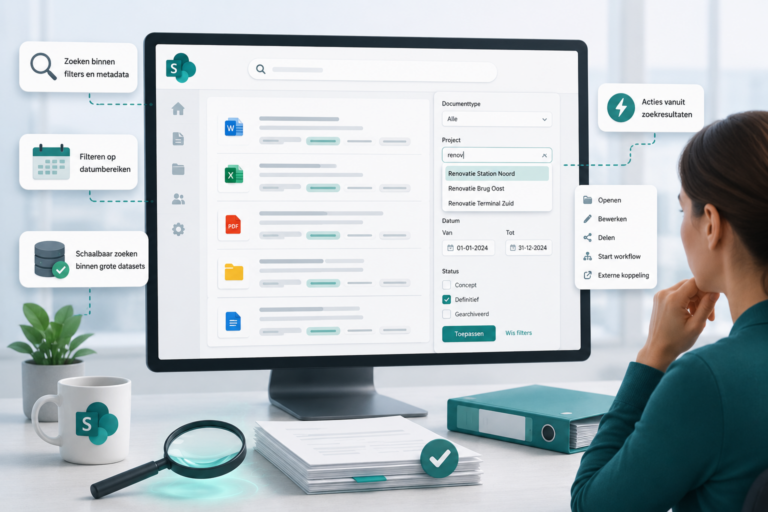
All contracts are managed in one central location, with visibility into status, term, value and responsible party.
Example: A contract manager sees in one view which service contracts will expire within three months and what action is required.
2. Full contract context
Contracts are linked to the correct customer, supplier or project. All attachments, addenda and relevant correspondence are readily available.
Example: When discussing agreements, you can immediately see which emails, amendments and addenda belong to the contract.
3. Automatic alerts and deadlines
Important moments such as renewals, notice periods and evaluations are automatically signaled.
Example: The contract owner receives timely notification when a maintenance contract is about to expire so that renegotiation is possible.
4. Version management and change history
There is always one leading contract version, including a full record of changes and approvals.
Example: During an audit, it is immediately visible which version is valid and when changes have been made.
5. Security and compliance
Access to contracts is role- and context-dependent. Sensitive information remains shielded and an audit trail is always available.
Example: Finance sees contract values, legal manages legal content and operations works with implementation agreements.
6. Collaborate without email chaos
Fixed workflows for review and approval ensure clear steps and responsibilities.
Example: A new contract automatically passes legal and management for approval, without separate emails or ambiguity.
Approach: quick results, without complex implementation
No lengthy IT processes or customization. The approach revolves around simplicity and overview. Together we look at the contract structure, roles and processes within the organization. On this basis, a logical and scalable setup is set up.
Thanks to standard templates and smart automation, the basics can often be set up within a short time. Where necessary, there is room for customization, for example in contract types, metadata or workflows, but always targeted and manageable. The result: a central, secure and future-proof contract environment that can be used immediately.
Conclusion
Want to get rid of contracts stored scattered around, missed deadlines and unnecessary risk? Are you looking for a solution that works quickly and connects to Microsoft 365? Discover how contract management based on SharePoint and WorkPoint provides overview, control and peace of mind within your organization.
Contact us for a demo or consultation. Together we’ll see how your organization can quickly get a grip on contracts.