From searching to finding: how to make employees find documents faster?

More and more organizations are choosing SharePoint as the central location for documents, files and collaboration. But the larger the document environment becomes, the more difficult it often becomes to retrieve information quickly. Employees spend more and more time searching between documents and working with metadata and filters, while searching should save time.

In this blog, we look at the most common frustrations surrounding search within SharePoint and how Advanced Search helps you find documents faster, filter smarter and make the entire search experience within SharePoint more user-friendly.

Searching often takes more time than necessary

Many employees recognize it. You know a document is somewhere in SharePoint, but finding it takes much longer than expected. You try different search terms, click through filters and endlessly scroll through metadata values and search results. Especially within large document environments, frustration quickly arises. The more documents, projects, files and metadata added, the more cluttered the search experience often becomes. Employees have to search more and more specifically to finally find the right document.

This may seem like a minor problem, but on a day-to-day basis, it imperceptibly costs organizations a lot of time. Processes slow down, employees become frustrated, and document management feels like an obstacle rather than a tool.

Many organizations recognize situations such as:

  • Endless scrolling through long filter lists
  • Not being able to filter by specific time periods
  • Unable to find documents while they exist
  • Too many irrelevant search results
  • Not knowing which metadata to search for
  • Filters missing important values
  • Need several search attempts before finding the correct document

But SharePoint just has a search function, right?

That’s right. The standard search functionality within SharePoint works fine for smaller environments and simple searches. But once organizations work with large volumes of documents, files and metadata, users often run into limitations in practice. Filters become cluttered, filter lists contain too many values and important filter options are missing due to standard SharePoint limits. Especially within large document management environments, searching often takes more time than organizations expect in advance as a result.

Users want to be able to find information quickly without technical knowledge of metadata, document structures or exact document names. This is precisely where the challenge often arises within larger SharePoint and WorkPoint environments. Therefore, a user-friendly and smart search experience is becoming increasingly important within modern document management environments.

From searching to finding with Advanced Search

I4-YOU’s Advanced Search adds a smart and user-friendly search layer to SharePoint and WorkPoint. The solution is designed to make large document environments more organized and user-friendly, without requiring organizations to implement a completely new platform. Advanced Search helps employees find the right documents faster by making smarter use of filters, metadata and search results.

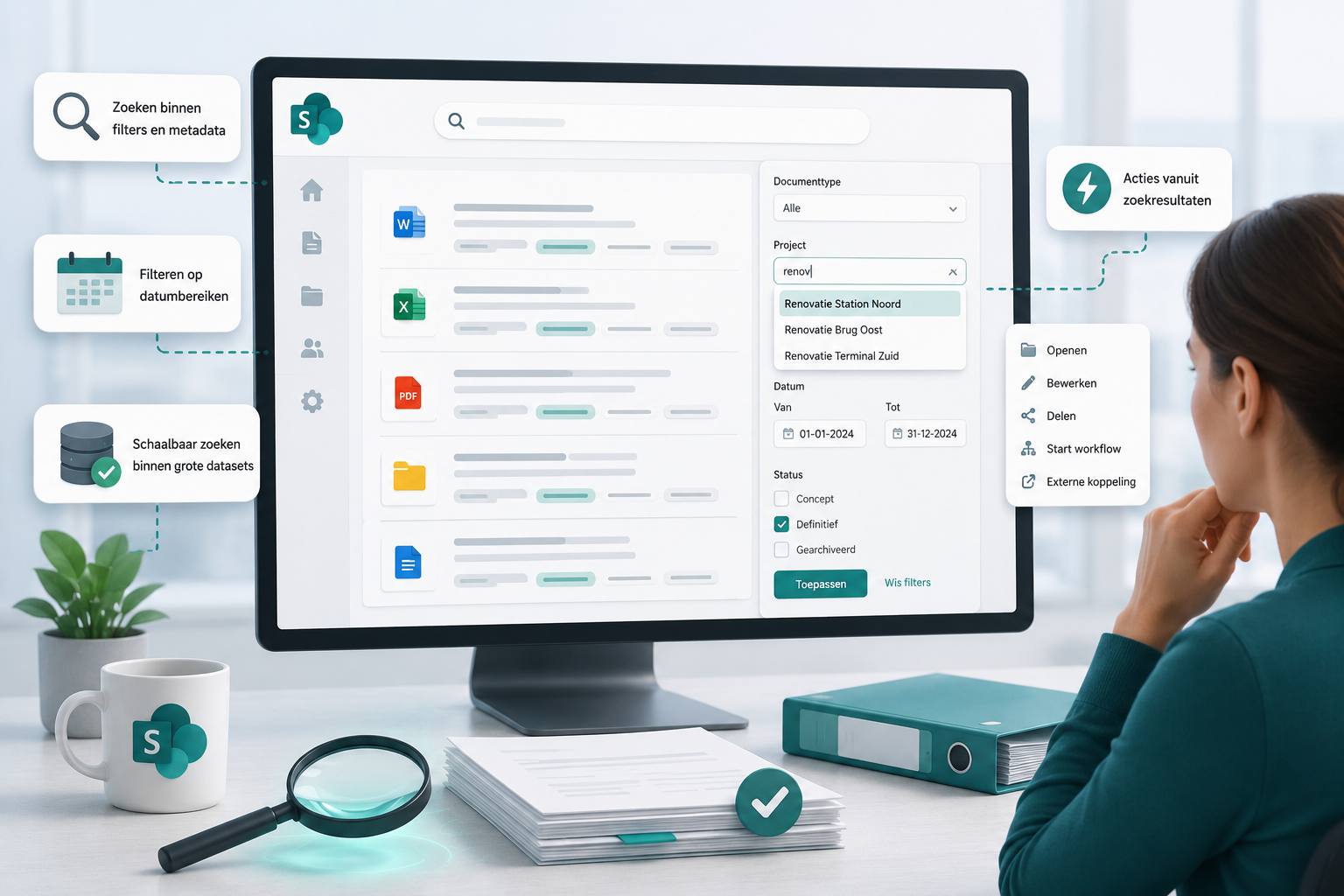
1. Filtering within filters and metadata
Within standard SharePoint searches, refiners often become long lists in which users have to scroll endlessly. Especially with unique metadata such as document numbers, project codes or customer names, this quickly becomes unworkable.

Advanced Search allows users to search directly within filter values. As they type, relevant suggestions appear immediately on the screen. As a result, employees find the right metadata value much faster without having to search through long lists.

What does this solve?

  • Less time spent scrolling through filter lists
  • Find the right metadata value faster
  • Less frustration with large document environments
  • More user-friendly searching within SharePoint and WorkPoint


2. Flexible filtering on date ranges

Not every search is the same. Sometimes users look for documents from a specific time period or combination of metadata.

With Advanced Search, users can easily filter by date ranges, such as documents from the past month, quarter or a specific time period. As a result, search results become relevant and clear faster.

What does this solve?

  • Fewer irrelevant search results
  • Faster refinement of search results
  • More control over searches
  • Less time spent manually searching within periods


3. Scalable search within large data sets

Within large SharePoint and WorkPoint environments, organizations often run into standard limits within SharePoint. Especially for columns with many unique values, filters become cluttered or important filter options are completely missing.

Advanced Search allows filtering on datasets with more than 1,000 unique values without performance degradation. This keeps searching fast and clear even within large document environments.

What does this solve?

  • Problems with standard SharePoint limits
  • Missing filter values
  • Poor user experience with large data sets
  • Difficult to filter large amounts of metadata


4. Personalized actions from search results

Search often doesn’t stop at finding a document. Employees want to be able to continue working immediately afterwards.

Advanced Search allows organizations to add their own actions to search results. Think of opening or editing documents directly, starting workflows or opening external systems with information from the found document. This makes search not just an endpoint, but part of the daily process.

What does this solve?

  • Fewer manual steps after searching
  • Perform follow-up actions faster
  • Less switching between systems
  • More efficient processes from SharePoint and WorkPoint

What can Advanced Search do for your organization?

Advanced Search helps organizations greatly improve document findability within SharePoint and WorkPoint. Employees find the right information faster, spend less time searching, and can work more efficiently within large document environments.

Because the solution operates entirely within the existing Microsoft 365 environment, existing permissions, metadata and governance are preserved. So organizations improve the search experience without having to implement a completely new platform. Whether it’s project documentation, contract management, records or technical documentation: Advanced Search helps organizations turn search back into finding.

Less searching, faster finding

Within many organizations, a lot of time goes unnoticed every day searching for documents. Especially as document environments continue to grow, good search functionality becomes increasingly important.

Wondering how Advanced Search works within your SharePoint or WorkPoint environment? We will be happy to show you in a short demo and together we will see where you can save time in document management and document findability.